Date: not given (version 7 of the guide, attached to the July 2009 report)Location: not stated
BAASS, 2009: the Capella database guide shows how each UAP report was logged across eleven spreadsheet screens
Appendix 3 of the BAASS ten-month report is the user guide for Project Capella, a set of nine spreadsheets with UAP reports from various sources. The guide describes field by field what was recorded, from the time and coordinates of the UAP to electromagnetic effects, ground traces, effects on the body and credibility assessment.
- Event date
- not given (version 7 of the guide, attached to the July 2009 report)
- Location
- not stated
- Topic
- AAWSAP and advanced technologies
- Source agencies
- DOW
- Documents
- 1 document · 538 pages
- Reading time
- 32 min
 Facsimile of the documentPhysical page 523
DOCUMENTARY SOURCES · DOW
What the records tell
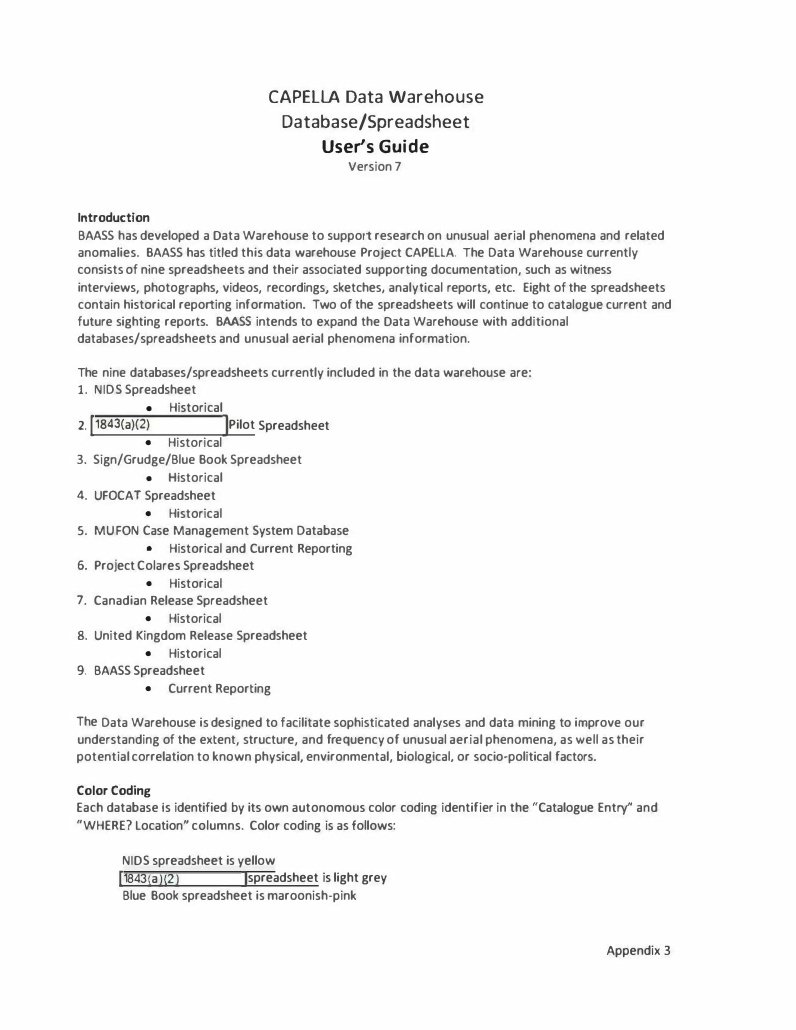
Date: not given; this is version 7 of the guide, attached to the July 2009 report. Location: not given. BAASS called its repository of data on unusual aerial phenomena Project Capella. According to the guide, it brought together nine spreadsheets: the NIDS one, one of pilot reports whose name is redacted, the one for projects Sign, Grudge and Blue Book, the UFOCAT catalog, the MUFON case system, a Project Colares spreadsheet, the files released by Canada and the United Kingdom, and BAASS's own spreadsheet for current reports.
The stated goal was to enable data mining to understand the extent, structure and frequency of these phenomena and to look for correlation with physical, environmental, biological or sociopolitical factors. Each source had a color in the spreadsheets. All used the same fields on the first ten screens, organized by a layer scheme whose name appears redacted. An eleventh screen held data from the source databases that did not fit the common format, so that nothing would be lost.
The first screens record when, where and what: date, location, summary, time of day and duration in minutes, with rules for uncertain dates. Then come witnesses, sources and quality control. The guide asks that the latitude and longitude be those of the UAP, not those of the witness, and assigns scores of 1 to 3 to the precision of the year, month, day, time and location. A code called SVP, with digits from 1 to 6, measures the reliability of the source, the detail of the site visit and the probability of a natural explanation.
The physical layer describes weather, terrain, shape, size, sound, lights, electromagnetic effects, ground traces, collected materials, trajectory, radar and images. A screen called the antiphysical layer records aspects that would appear to contradict classical physics, such as a UAP that suddenly vanishes. Other screens deal with witness reactions, physiological and pathological effects on people, animals and plants, animal reactions, loss of time or memory, and observed life forms. Case classification used codes of two letters and a number, such as FB1 or CE5, from a guide whose name is redacted.
The document describes the structure of the database, not its content: it contains no logged case and no count of reports. It shows that BAASS intended to record, in a single format, everything from the credibility assigned to the witness to whether the case was identified or deemed a hoax. There are errors in the text, such as the latitude range of 0 to 180 degrees. The existence of a field for pathological effects or life forms shows what the company wanted to record, not that these phenomena were confirmed.
DIRECT READING OF THE FILE
The document, in the original
Physical pages 523 to 534 are translated in full in the page-by-page blocks, including the keywords in English, the region code table and the redaction markings.
EXCERPT 1 · PHYSICAL PAGE 523
Physical page 523, full page
CAPELLA Data Warehouse
Database/Spreadsheet
User's Guide
Version 7
Introduction
BAASS has developed a Data Warehouse to support research on unusual aerial phenomena and related
anomalies. BAASS has titled this data warehouse Project CAPELLA. The Data Warehouse currently
consists of nine spreadsheets and their associated supporting documentation, such as witness
interviews, photographs, videos, recordings, sketches, analytical reports, etc. Eight of the spreadsheets
contain historical reporting information. Two of the spreadsheets will continue to catalogue current and
future sighting reports. BAAS$ intends to expand the Data Warehouse with additional
databases/spreadsheets and unusual aerial phenomena information.
The nine databases/spreadsheets currently included in the data warehouse are:
1. NIDS Spreadsheet
•
Historical
2. l1843(a)(2)
!Pilot Spreadsheet
•
Historical
3. Sign/Grudge/Blue Book Spreadsheet
•
Historical
4. UFOCAT Spreadsheet
•
Historical
5. MU FON Case Management System Database
•
Historical and Current Reporting
6. Project Colares Spreadsheet
•
Historical
7. Canadian Release Spreadsheet
•
Historical
8. United Kingdom Release Spreadsheet
•
Historical
9. BAASS Spreadsheet
•
Current Reporting
The Data Warehouse is designed to facilitate sophisticated analyses and data mining to improve our
understanding of the extent, structure, and frequency of unusual aerial phenomena, as well as their
potential correlation to known physical, environmental, biological, or socio-political factors.
Color Coding
Each database is identified by its own autonomous color coding identifier in the "Catalogue Entry" and
"WHERE? Location" columns. Color coding is as follows:
NIDS spreadsheet is yellow
!1843(a)(2)
!spreadsheet is light grey
Blue Book spreadsheet is maroonish-pink
Appendix 3Editorial note: Physical page 523 of DOW-UAP-D172-BAASS_Ten_Month_Report_July-2009.pdf.
Check the original PDF
CAPELLA Data Warehouse
Database/Spreadsheet
User's Guide
Version 7
Introduction
BAASS has developed a Data Warehouse to support research on unusual aerial phenomena and related
anomalies. BAASS has titled this data warehouse Project CAPELLA. The Data Warehouse currently
consists of nine spreadsheets and their associated supporting documentation, such as witness
interviews, photographs, videos, recordings, sketches, analytical reports, etc. Eight of the spreadsheets
contain historical reporting information. Two of the spreadsheets will continue to catalogue current and
future sighting reports. BAAS$ intends to expand the Data Warehouse with additional
databases/spreadsheets and unusual aerial phenomena information.
The nine databases/spreadsheets currently included in the data warehouse are:
1. NIDS Spreadsheet
•
Historical
2. l1843(a)(2)
!Pilot Spreadsheet
•
Historical
3. Sign/Grudge/Blue Book Spreadsheet
•
Historical
4. UFOCAT Spreadsheet
•
Historical
5. MU FON Case Management System Database
•
Historical and Current Reporting
6. Project Colares Spreadsheet
•
Historical
7. Canadian Release Spreadsheet
•
Historical
8. United Kingdom Release Spreadsheet
•
Historical
9. BAASS Spreadsheet
•
Current Reporting
The Data Warehouse is designed to facilitate sophisticated analyses and data mining to improve our
understanding of the extent, structure, and frequency of unusual aerial phenomena, as well as their
potential correlation to known physical, environmental, biological, or socio-political factors.
Color Coding
Each database is identified by its own autonomous color coding identifier in the "Catalogue Entry" and
"WHERE? Location" columns. Color coding is as follows:
NIDS spreadsheet is yellow
!1843(a)(2)
!spreadsheet is light grey
Blue Book spreadsheet is maroonish-pink
Appendix 3View the document record ↗ · Physical page 523, counting the cover.
EXCERPT 2 · PHYSICAL PAGE 524
Physical page 524, full page
Data Iype: General
UFOCAT spreadsheet is light green
MUFON database is TBD
Cola res spreadsheet is very light purple
Canada spreadsheet is peach
UK spreadsheet is baby blue
BAASS spreadsheet is light purple
1 843(a)(2)
Screen Format
Each CAPELLA spreadsheet is a Microsoft© Excel flat-file, The spreadsheet is formatted in a series of
"screens." Each screen isodesigned to be presented or p࠼inted as a set of congr࠽en࠾ iformࡀtion based
1 843(a)(2)
.
on thࡁ- - - -
lc!ࡂac:::]s,x-Layer Model. All Data warehouse spreadsheets maintain 1dent1cal data
·o
fields i_o.the first ten screens, which represent thࡃ
!CAPELLA format. Some spreadsheets contain
1 843(a)(2)-a1felࡄventh screen which displays supplemental information that was contained in the originating
database, but does not have a corollary data field in the ten screen format. The eleventh screen is used
so that information from original databases is not lost.
SCREEN 1
WHEN -WHEREl· WHAT
Column A
Line Number
Data Type: Number
Identifies row number starting with column titles. Line numbers do not correlate with or match
Catalogue Entry numbers. Column A is used to quickly sort the spreadsheet back to the original format.
Column B
Catalogue Entry
'G-=}-Q3- <&(?Lo___o__o____
database; "N" = NIDS database; "UBS"o= Blue Book database; "U" = UFOCAT database) and Case
1843(a_)(2) _ Number .... fQ.r..ࡅxampte, .:j--
r is case number 16 in thej1843(a)(2)
I Pilot database.
Column C
WHEN? Day
Data Type: Text
The date, in one or two digit number format, the event occurred. No leading zeros are input. If the date
is not known, the field is left blank. If the event occurred sometime specifically within a known date
window, but the exact date is unknown, the window is input as a date spread. For example, if an event
occurred "sometime between the 2nd and the gm," then "2.9" is input. The decimal point is used to
allow this field to be sorted chronologically, as if the dates were numbers in hundredths. If the event is
recurring or occurred within a specific date range, the original single date the event was reported is
input and a comment should be included in the description that the event is ongoing or recurred within
a specific window.
Column D
WHEN? Month
Data Type: Text
The month, in one or two digit number format, the event occurred. No leading zeros are input. If the
month is not known, the field is left blank. If the event occurred sometime specificall'y within a known
window, the window is input as a date spread using a decimal point. For example, if an event is
reported as occurring "during the summer," then "5.8" is input. If the event is recurring, the original
single month the event was reported is input.
Column E
WHEN? Year
Data Type: Text
The year, in four digit number format, the event occurred. If the year is not known, the field is left
blank. If the event occurred sometime specifically within a known window, the window is input as a
date spread using a decimal point. Only the last two digits of the ending year are input after the decimal
Appendix 3
Identifies the particular database (e.g. "B" = BAASS database;
IPilot_ _ o 1843(a)(2)
_Editorial note: Physical page 524 of DOW-UAP-D172-BAASS_Ten_Month_Report_July-2009.pdf.
Check the original PDF
Data Iype: General
UFOCAT spreadsheet is light green
MUFON database is TBD
Cola res spreadsheet is very light purple
Canada spreadsheet is peach
UK spreadsheet is baby blue
BAASS spreadsheet is light purple
1 843(a)(2)
Screen Format
Each CAPELLA spreadsheet is a Microsoft© Excel flat-file, The spreadsheet is formatted in a series of
"screens." Each screen isodesigned to be presented or p࠼inted as a set of congr࠽en࠾ iformࡀtion based
1 843(a)(2)
.
on thࡁ- - - -
lc!ࡂac:::]s,x-Layer Model. All Data warehouse spreadsheets maintain 1dent1cal data
·o
fields i_o.the first ten screens, which represent thࡃ
!CAPELLA format. Some spreadsheets contain
1 843(a)(2)-a1felࡄventh screen which displays supplemental information that was contained in the originating
database, but does not have a corollary data field in the ten screen format. The eleventh screen is used
so that information from original databases is not lost.
SCREEN 1
WHEN -WHEREl· WHAT
Column A
Line Number
Data Type: Number
Identifies row number starting with column titles. Line numbers do not correlate with or match
Catalogue Entry numbers. Column A is used to quickly sort the spreadsheet back to the original format.
Column B
Catalogue Entry
'G-=}-Q3- <&(?Lo___o__o____
database; "N" = NIDS database; "UBS"o= Blue Book database; "U" = UFOCAT database) and Case
1843(a_)(2) _ Number .... fQ.r..ࡅxampte, .:j--
r is case number 16 in thej1843(a)(2)
I Pilot database.
Column C
WHEN? Day
Data Type: Text
The date, in one or two digit number format, the event occurred. No leading zeros are input. If the date
is not known, the field is left blank. If the event occurred sometime specifically within a known date
window, but the exact date is unknown, the window is input as a date spread. For example, if an event
occurred "sometime between the 2nd and the gm," then "2.9" is input. The decimal point is used to
allow this field to be sorted chronologically, as if the dates were numbers in hundredths. If the event is
recurring or occurred within a specific date range, the original single date the event was reported is
input and a comment should be included in the description that the event is ongoing or recurred within
a specific window.
Column D
WHEN? Month
Data Type: Text
The month, in one or two digit number format, the event occurred. No leading zeros are input. If the
month is not known, the field is left blank. If the event occurred sometime specificall'y within a known
window, the window is input as a date spread using a decimal point. For example, if an event is
reported as occurring "during the summer," then "5.8" is input. If the event is recurring, the original
single month the event was reported is input.
Column E
WHEN? Year
Data Type: Text
The year, in four digit number format, the event occurred. If the year is not known, the field is left
blank. If the event occurred sometime specifically within a known window, the window is input as a
date spread using a decimal point. Only the last two digits of the ending year are input after the decimal
Appendix 3
Identifies the particular database (e.g. "B" = BAASS database;
IPilot_ _ o 1843(a)(2)
_View the document record ↗ · Physical page 524, counting the cover.
EXCERPT 3 · PHYSICAL PAGE 525
Physical page 525, full page
point. For example, if an event is reported as occurring "during the 1970s," then "1970.79" is input. If
the event is recurring, the original single year the event was reported is input.
Column F
WHERE? Location
Data Type: Text
The location the event occurred. Indicated by "city, state" or "locality, state" if within the United States.
International locations are recorded as "city, country" or "locality, country."
Column G
WHAT? Summary Description
Data Type: Text
A brief description of the event, ideally containing the following content: Number of observed objects;
Summarized description of object(s); and brief description of object(s') actions.
KEYWORDS: Ongoing
1 843(a)(2)
1 843(a)(2)
::,lumn"H • ·E]c1assification
Data Type: General
-
-.
-
The two letter and single numeric code per the! •• ࡆlassification Guide. BAASS management will
1o843(a)(2)ࡇࡈtl:!..r.minࡉ ·
!classifications if not previously determined.
KEYWORDS: FBl, FB2, FB3, FB4, FBS, MAl, MA2, MA3, MA4, MAS, CEl, CE2, CE3, CE4, CES, ANl, AN2,
AN3, AN4, ANS
Column I
Time of Day
Data Type: Text
The light conditions at the time the object(s) were observed. Input is one of four options: daylight,
dusk, night, or dawn. If more than one lighting condition exists during the sighting, input all that apply.
For example, when an object is first observed at 3:00 AM (night time lighting conditions) and is
continuously observed until 9:30 AM (through dawn and into full daylight), the text "night, dawn,
daylight" will be input. In this example, "03:00" would be input into column W as the local time the
sighting began, and "390" would be input into column J for duration of sighting. Impacts to lighting
conditions, such as haze or fog, are not input in this data field. Such conditions are input into column
AO, Weather.
KEYWORDS: Daylight, Dusk, Night, Dawn
Column J
Duration Minutes
Data Type: Text
The duration of time the sighting lasted in numbers of minutes. If a sighting lasted for less than one
minute, input time in hundredths of minutes. For example, a 15 second sighting is input as "0.25".
Sightings that have estimated duration ranges in minutes, are input as a range using a decimal point.
For example, when a witness reports the event "lasted 15-20 minutes," then "15.20" is input. Sightings
that have estimated duration ranges less than one minute are input using the middle of the time range
in hundredths of a minute. For example, a sighting reported as "lasting 20-30 seconds" is considered as
if it lasted 25 seconds, and "0o42" is input. The formula for determining durations less than one minute
is:
.o
Number of Seconds Observed divided by 60, or more simply stated: # Seconds/60
SCREEN 2
WITNESSES AND REFERENCES
Column K
Catalogue Entry
Data Type: Text
Repeats the information in column B for easy identification in this screen.
Column L
WHERE? Location
Data Type: Text
Repeats the information in column F for easy identification in this screen.
Appendix 3Editorial note: Physical page 525 of DOW-UAP-D172-BAASS_Ten_Month_Report_July-2009.pdf.
Check the original PDF
point. For example, if an event is reported as occurring "during the 1970s," then "1970.79" is input. If
the event is recurring, the original single year the event was reported is input.
Column F
WHERE? Location
Data Type: Text
The location the event occurred. Indicated by "city, state" or "locality, state" if within the United States.
International locations are recorded as "city, country" or "locality, country."
Column G
WHAT? Summary Description
Data Type: Text
A brief description of the event, ideally containing the following content: Number of observed objects;
Summarized description of object(s); and brief description of object(s') actions.
KEYWORDS: Ongoing
1 843(a)(2)
1 843(a)(2)
::,lumn"H • ·E]c1assification
Data Type: General
-
-.
-
The two letter and single numeric code per the! •• ࡆlassification Guide. BAASS management will
1o843(a)(2)ࡇࡈtl:!..r.minࡉ ·
!classifications if not previously determined.
KEYWORDS: FBl, FB2, FB3, FB4, FBS, MAl, MA2, MA3, MA4, MAS, CEl, CE2, CE3, CE4, CES, ANl, AN2,
AN3, AN4, ANS
Column I
Time of Day
Data Type: Text
The light conditions at the time the object(s) were observed. Input is one of four options: daylight,
dusk, night, or dawn. If more than one lighting condition exists during the sighting, input all that apply.
For example, when an object is first observed at 3:00 AM (night time lighting conditions) and is
continuously observed until 9:30 AM (through dawn and into full daylight), the text "night, dawn,
daylight" will be input. In this example, "03:00" would be input into column W as the local time the
sighting began, and "390" would be input into column J for duration of sighting. Impacts to lighting
conditions, such as haze or fog, are not input in this data field. Such conditions are input into column
AO, Weather.
KEYWORDS: Daylight, Dusk, Night, Dawn
Column J
Duration Minutes
Data Type: Text
The duration of time the sighting lasted in numbers of minutes. If a sighting lasted for less than one
minute, input time in hundredths of minutes. For example, a 15 second sighting is input as "0.25".
Sightings that have estimated duration ranges in minutes, are input as a range using a decimal point.
For example, when a witness reports the event "lasted 15-20 minutes," then "15.20" is input. Sightings
that have estimated duration ranges less than one minute are input using the middle of the time range
in hundredths of a minute. For example, a sighting reported as "lasting 20-30 seconds" is considered as
if it lasted 25 seconds, and "0o42" is input. The formula for determining durations less than one minute
is:
.o
Number of Seconds Observed divided by 60, or more simply stated: # Seconds/60
SCREEN 2
WITNESSES AND REFERENCES
Column K
Catalogue Entry
Data Type: Text
Repeats the information in column B for easy identification in this screen.
Column L
WHERE? Location
Data Type: Text
Repeats the information in column F for easy identification in this screen.
Appendix 3View the document record ↗ · Physical page 525, counting the cover.
EXCERPT 4 · PHYSICAL PAGE 526
Physical page 526, full page
Column M
WHO SAW IT? Witnesses
Data Type: Text
The full name (las1, firs1 middle) of the primary witness observing or reporting the event. If the las1 or
first name is not known, input a question mark "?". If middle name or initial is not known, do not input
anything. For example, if a witness' name i
input
If witness is
1 843(a)(2)onlyr.eported asl- ·- -· -
L input "?J
:=-t-'-
_----
-
--
-- -- -
1 843(a)(2)
-
····
-
Column N
WHO says so?
Data Type: Text
The source of information used to input data. The source may be a n investigator or other person, a
website report, etc. Sources are usually not witnesses.
ColumnoO
Other sources
Data Type: Text
List number of additional witnesses other than the primary witness listed in column M. Use the same
naming convention as in column M. Al.so input additional sources of information not indicated in
column N, such as newspaper or internet articles. Provide amplifying information as required.
SCREEN 3
QUALITY CONTROL
Column P
Catalogue Entry
Data Type: Text
Repeats the information in column B for easy identification in this screen.
Column Q
WHERf? Location
Data Type: Text
Repeats the information in column F for easy identification in this screen.
Column R
Region code
Data Type: Text
The three character identifier for the region of the world in which the event occurred. Identifiers
include:
AFR
Africa
ASP
A.sia - South Pacific
CAM
Cenil:ral America
EEU
Eastern Europe
MDE
Middle East
NAF
North Africa
NAM
North America
NEU
Northern Europe
SAF
South Africa
SAM
South America
SEA
Southeast Asia
SEU
Southern Europe
WEU
Western Europe
Column S
Country code
Data Type: Text
The two character identifier for the country in which the event occurred. Country codes are per ISO
-
3166-1 and the corresponding ISO 3166-1oalpha-2 code elements.
Column T
State or Province
DataType: Text
The two character identifier for the state or province in which the event occurred.
Column U
Julian date
Data Type: Number
The seven digit numerical code which identifies and distinguishes the particular date (by date, month,
and year) the event occurred. If date of event is not known, this field is left blank. If the date of
occurrence falls within a date range, the first date of occurrence, or the first date in the range is input.
Decimal points are not used in the Julian date to indicate time.
Column V
Time zone
Data Type: Number
The positive or negative numerical code that identifies the local time zone where the event occurred
from Greenwich Mean Time (GMT).
Appendix 3Editorial note: Physical page 526 of DOW-UAP-D172-BAASS_Ten_Month_Report_July-2009.pdf.
Check the original PDF
Column M
WHO SAW IT? Witnesses
Data Type: Text
The full name (las1, firs1 middle) of the primary witness observing or reporting the event. If the las1 or
first name is not known, input a question mark "?". If middle name or initial is not known, do not input
anything. For example, if a witness' name i
input
If witness is
1 843(a)(2)onlyr.eported asl- ·- -· -
L input "?J
:=-t-'-
_----
-
--
-- -- -
1 843(a)(2)
-
····
-
Column N
WHO says so?
Data Type: Text
The source of information used to input data. The source may be a n investigator or other person, a
website report, etc. Sources are usually not witnesses.
ColumnoO
Other sources
Data Type: Text
List number of additional witnesses other than the primary witness listed in column M. Use the same
naming convention as in column M. Al.so input additional sources of information not indicated in
column N, such as newspaper or internet articles. Provide amplifying information as required.
SCREEN 3
QUALITY CONTROL
Column P
Catalogue Entry
Data Type: Text
Repeats the information in column B for easy identification in this screen.
Column Q
WHERf? Location
Data Type: Text
Repeats the information in column F for easy identification in this screen.
Column R
Region code
Data Type: Text
The three character identifier for the region of the world in which the event occurred. Identifiers
include:
AFR
Africa
ASP
A.sia - South Pacific
CAM
Cenil:ral America
EEU
Eastern Europe
MDE
Middle East
NAF
North Africa
NAM
North America
NEU
Northern Europe
SAF
South Africa
SAM
South America
SEA
Southeast Asia
SEU
Southern Europe
WEU
Western Europe
Column S
Country code
Data Type: Text
The two character identifier for the country in which the event occurred. Country codes are per ISO
-
3166-1 and the corresponding ISO 3166-1oalpha-2 code elements.
Column T
State or Province
DataType: Text
The two character identifier for the state or province in which the event occurred.
Column U
Julian date
Data Type: Number
The seven digit numerical code which identifies and distinguishes the particular date (by date, month,
and year) the event occurred. If date of event is not known, this field is left blank. If the date of
occurrence falls within a date range, the first date of occurrence, or the first date in the range is input.
Decimal points are not used in the Julian date to indicate time.
Column V
Time zone
Data Type: Number
The positive or negative numerical code that identifies the local time zone where the event occurred
from Greenwich Mean Time (GMT).
Appendix 3View the document record ↗ · Physical page 526, counting the cover.
EXCERPT 5 · PHYSICAL PAGE 527
Physical page 527, full page
Column W
Local Time hh:mm
Data Type: Time - hh:mm
The local time the event began or was first observed. Input is in four numerical digits separated by a
colon using the 24-hour clock (military) time system. Input leading zeros, as required. For example,
3:15 PM is input as "15:15" and 8:30 AM is input as "08:30".
Column X
Time UTZ
Data Type: Time - hh:mm
The universal time (Greenwich Mean Time)(same as Zulu time) that the event occurred. Universal time
equals the local time minus the time zone. For example, for a local California (PST) time of 23:30, the
time zone is minus eight (-8). Therefore, the universal time is 07:30 (23:30- (-8) = 07:30).
Column Y
Long. deg.
Data Type: Text
The degrees of longitude where the object was located (not where the witness was located). Input as
one, two, or three numerical characters without any leading zeros. If several positions of the object are
identified, all longitude and latitude numbers are for the initial known position. Degrees range from 0
through 180.
Column Z
Long. min.
Data Type: Text
The minutes of longitude where the object was located. Input as two numerical digits with a leading
zero, if required. Minutes range from 00 through 60.
Column AA
Long. sec.
Data Type: Text
The seconds of longitude where the object was located. Input as two numerical digits with a leading
zero, if required. Seconds range from 00 through 60.
Column AB
Long. E/W
Data Type: Text
The east (E) or west (W) identifier of longitude where the object was located referencing the Prime
Meridian (Greenwich Meridian).
Column AC
Lat. deg.
Data Type: Text
The degrees of latitude where the object was located (not where the witness was located). Input as
one, two, or three numerical characters without any leading zeros. If several positions of the object are
identified, all longitude and latitude numbers are for the initial known position. Degrees range from 000
through 180.
Column AD
Lat. min.
Data Type: Text
The minutes of latitude where the object was located. Input as two numerical digits with a leading zero,
if required. Minutes range from 00 through 60.
Column AE
Lat. sec.
Data Type: Text
The seconds of latitude where the object was located. Input as two numerical digits with a leading zero,
if required. Seconds range from 00 through 60.
Column AF
Lat. N/S
Data Type: Text
The north (N) or south (S) identifier of latitude where the object was located referencing the equator.
Column AG
AccuracyY
Data Type: Number
Appendix 3Editorial note: Physical page 527 of DOW-UAP-D172-BAASS_Ten_Month_Report_July-2009.pdf.
Check the original PDF
Column W
Local Time hh:mm
Data Type: Time - hh:mm
The local time the event began or was first observed. Input is in four numerical digits separated by a
colon using the 24-hour clock (military) time system. Input leading zeros, as required. For example,
3:15 PM is input as "15:15" and 8:30 AM is input as "08:30".
Column X
Time UTZ
Data Type: Time - hh:mm
The universal time (Greenwich Mean Time)(same as Zulu time) that the event occurred. Universal time
equals the local time minus the time zone. For example, for a local California (PST) time of 23:30, the
time zone is minus eight (-8). Therefore, the universal time is 07:30 (23:30- (-8) = 07:30).
Column Y
Long. deg.
Data Type: Text
The degrees of longitude where the object was located (not where the witness was located). Input as
one, two, or three numerical characters without any leading zeros. If several positions of the object are
identified, all longitude and latitude numbers are for the initial known position. Degrees range from 0
through 180.
Column Z
Long. min.
Data Type: Text
The minutes of longitude where the object was located. Input as two numerical digits with a leading
zero, if required. Minutes range from 00 through 60.
Column AA
Long. sec.
Data Type: Text
The seconds of longitude where the object was located. Input as two numerical digits with a leading
zero, if required. Seconds range from 00 through 60.
Column AB
Long. E/W
Data Type: Text
The east (E) or west (W) identifier of longitude where the object was located referencing the Prime
Meridian (Greenwich Meridian).
Column AC
Lat. deg.
Data Type: Text
The degrees of latitude where the object was located (not where the witness was located). Input as
one, two, or three numerical characters without any leading zeros. If several positions of the object are
identified, all longitude and latitude numbers are for the initial known position. Degrees range from 000
through 180.
Column AD
Lat. min.
Data Type: Text
The minutes of latitude where the object was located. Input as two numerical digits with a leading zero,
if required. Minutes range from 00 through 60.
Column AE
Lat. sec.
Data Type: Text
The seconds of latitude where the object was located. Input as two numerical digits with a leading zero,
if required. Seconds range from 00 through 60.
Column AF
Lat. N/S
Data Type: Text
The north (N) or south (S) identifier of latitude where the object was located referencing the equator.
Column AG
AccuracyY
Data Type: Number
Appendix 3View the document record ↗ · Physical page 527, counting the cover.
EXCERPT 6 · PHYSICAL PAGE 528
Physical page 528, full page
The accuracy code associated with the year the event took place - listed in column E. Accuracy codes
range from 1 through 3, where:
•
3 indicates the exact year is known and listed in column E
•
2 indicates the year listed in column E is approximate - plus or minus 2 years
•
1 indicates the year is unknown
Column AH
Accuracy M
Data Type: Number
The accuracy code associated with the month the event took place - listed in column D. Accuracy codes
range from 1 through 3, where:
•
3 indicates the exact month is known and listed in column D
•
2 indicates the month listed in column O is approximate - plus or minus 2 months
•
1 indicates the month is unknown
Column Al
Accuracy D
Data Type: Number
The accuracy code associated with the date (day) the event took place - listed in column C. Accuracy
codes range from 1 through 3, where:
•
3 indicates the exact date is known and listed in column C
•
2 indicates the date listed in column C is appr0><imate - plus or minus 2 days
•
1 indicates the date is unknown
Column AJ
Accuracy H
Data Type: Number
The accuracy code associated with the time the event took place - listed in columns W and X. Accuracy
codes range from 1 through 3, where:
•
3 indicates the exact time is known and listed
•
2 indicates the time listed is approximate -plus or minus 2 hours
•
1 indicates the time is unknown
Column AK
Accuracy foe.
Data Type: Number
The accuracy code associated with the location of the object (not the witness)o- listed in column F.
Accuracy codes range from 1 through 3, where:
•
3 indicates the location is known and listed within one kilometer. Latitude and
Longitude should be input.
•
2 indicates the location is known and listed within ten kilometers. Latitude and
Longitude may be input.
•
1 indicates the location is unknown. Latitude and Longitude should not be input.
Column AL
SVP code
Data Type: Number
This is a three digit numerical code that identifies the reliability of the source {SJ, the detail of the site
visit {VJ, and the probability of natural explanations per the!
}::lassificationoG.uide . .BAAS.S
1 843(a)(2)
management will determine SVP code if not previously determined. Individual digits range from 1
through 6. The hisher the individual digit, the higher the assigned credibility.
SCREEN 4
PHYSICAL LAYER
Column AM
Catalogue Entry
Data Type: Text
Repeats the information in column B for easy identification in this screen.
Appendix 3Editorial note: Physical page 528 of DOW-UAP-D172-BAASS_Ten_Month_Report_July-2009.pdf.
Check the original PDF
The accuracy code associated with the year the event took place - listed in column E. Accuracy codes
range from 1 through 3, where:
•
3 indicates the exact year is known and listed in column E
•
2 indicates the year listed in column E is approximate - plus or minus 2 years
•
1 indicates the year is unknown
Column AH
Accuracy M
Data Type: Number
The accuracy code associated with the month the event took place - listed in column D. Accuracy codes
range from 1 through 3, where:
•
3 indicates the exact month is known and listed in column D
•
2 indicates the month listed in column O is approximate - plus or minus 2 months
•
1 indicates the month is unknown
Column Al
Accuracy D
Data Type: Number
The accuracy code associated with the date (day) the event took place - listed in column C. Accuracy
codes range from 1 through 3, where:
•
3 indicates the exact date is known and listed in column C
•
2 indicates the date listed in column C is appr0><imate - plus or minus 2 days
•
1 indicates the date is unknown
Column AJ
Accuracy H
Data Type: Number
The accuracy code associated with the time the event took place - listed in columns W and X. Accuracy
codes range from 1 through 3, where:
•
3 indicates the exact time is known and listed
•
2 indicates the time listed is approximate -plus or minus 2 hours
•
1 indicates the time is unknown
Column AK
Accuracy foe.
Data Type: Number
The accuracy code associated with the location of the object (not the witness)o- listed in column F.
Accuracy codes range from 1 through 3, where:
•
3 indicates the location is known and listed within one kilometer. Latitude and
Longitude should be input.
•
2 indicates the location is known and listed within ten kilometers. Latitude and
Longitude may be input.
•
1 indicates the location is unknown. Latitude and Longitude should not be input.
Column AL
SVP code
Data Type: Number
This is a three digit numerical code that identifies the reliability of the source {SJ, the detail of the site
visit {VJ, and the probability of natural explanations per the!
}::lassificationoG.uide . .BAAS.S
1 843(a)(2)
management will determine SVP code if not previously determined. Individual digits range from 1
through 6. The hisher the individual digit, the higher the assigned credibility.
SCREEN 4
PHYSICAL LAYER
Column AM
Catalogue Entry
Data Type: Text
Repeats the information in column B for easy identification in this screen.
Appendix 3View the document record ↗ · Physical page 528, counting the cover.
EXCERPT 7 · PHYSICAL PAGE 529
Physical page 529, full page
Column AN
WHERE? Location
Data Type: Text
Repeats the information in column F for easy identification in this screen.
Column AO
Weather
Data Type: Text
The reported weather conditions at the object's location. If known, include:
•
Cloud cover in 1/8th increments (3/8 covered) or verbal description [few(!> 1/8 obscured),
scattered (2/8 - 3/8 obscured), broken (4/8 - 6/8 obscured), overcast (ţ7 /8 obscured)]
•
Cloud height in feet above ground level (AGL) or mean sea level (MSL)
•
Cloud conditions, such as thunder cells, cirrus, stratus, etc.
•
Temperature in degrees Fahrenheit
•
Visibility in miles or verbal description, such as clear, hazy, foggy
•
Wind direction (semi-cardinal heading wind is originating from) and speed in miles per hour
specify if wind is at observer's location/altitude or object's location/altitude
•
Barometric pressure
•
Any additional amplifying information
KEYWORDS: Temperature: _°F, Sunny, Hot, Cold, Chilled, Clear, Few, Scattered, Broken, Overcast,
Obscured, Haze, Mist, Fog, Visibility:e_ miles, Feet AGL, Feet MSL
Column AP
Site (or terrain)
Data Type: Text
Description of the general location of the object. For example, metropolitan, rural, desert, sparse forest,
mountainous, etc. Multiple words can be used to describe the site.
Column AQ
Nature of phenomenon
Data Type: Text
This field states the number of object(s) and describes the appearance of the object(s), including color,
surface structure, windows or portholes, etc. If BAASS has access to sketches or diagrams indicating the
object(s)' appearance, it should be scanned and linked in the Hyperlinks field.
KEYWORDS: Spatial Alteration, (Colors), (Shapes), Window(s), Porthole(s)
Column AR
Shape
Data Type: Text
This field describes the shape of the object(s). May be a single word, e.g. "triangle", or may include
amplifying information, e.g. "cone with 2 stabilizers 1/3 back from pointy end - stabilizers mid-structure
on opposite sides". If BAASS has access to sketches or diagrams indicating the object(s)' shape, it should
be scanned and linked in the Hyperlinks field.
KEYWORDS: Spatial Alteration, (Shapes), Wing(s), Tail(s), Stabilizer(s), Thruster(s)
Column AS
Size meters
Data Type: Text
This field describes the length or dimensions of the object(s) in meters preferably, or as a comparison to
a know object, e.g. "a 747 aircraft". If size cannot be determined, then a comparison to an object at
arm's length may be input, e.g., "a nickel (dime, quarter, half-dollar, silver dollar, baseball, softball,
basketball, one/two/three/four finger(s)) at arm's length."
KEYWORDS: Spatial Alteration
Column AT
Sound
Data Type: Text
This field describes the sound the object made as reported by the witness. May contain a comparison to
a common sound made by a known event, e.g. "like the hum of an electrical transformer". If the object
did not hear any sound, input "none". If it was not reported whether the witness heard any sound or
not, leave the field blank. If BAASS has access to audio recordings, it should be annotated in the
Appendix 3Editorial note: Physical page 529 of DOW-UAP-D172-BAASS_Ten_Month_Report_July-2009.pdf.
Check the original PDF
Column AN
WHERE? Location
Data Type: Text
Repeats the information in column F for easy identification in this screen.
Column AO
Weather
Data Type: Text
The reported weather conditions at the object's location. If known, include:
•
Cloud cover in 1/8th increments (3/8 covered) or verbal description [few(!> 1/8 obscured),
scattered (2/8 - 3/8 obscured), broken (4/8 - 6/8 obscured), overcast (ţ7 /8 obscured)]
•
Cloud height in feet above ground level (AGL) or mean sea level (MSL)
•
Cloud conditions, such as thunder cells, cirrus, stratus, etc.
•
Temperature in degrees Fahrenheit
•
Visibility in miles or verbal description, such as clear, hazy, foggy
•
Wind direction (semi-cardinal heading wind is originating from) and speed in miles per hour
specify if wind is at observer's location/altitude or object's location/altitude
•
Barometric pressure
•
Any additional amplifying information
KEYWORDS: Temperature: _°F, Sunny, Hot, Cold, Chilled, Clear, Few, Scattered, Broken, Overcast,
Obscured, Haze, Mist, Fog, Visibility:e_ miles, Feet AGL, Feet MSL
Column AP
Site (or terrain)
Data Type: Text
Description of the general location of the object. For example, metropolitan, rural, desert, sparse forest,
mountainous, etc. Multiple words can be used to describe the site.
Column AQ
Nature of phenomenon
Data Type: Text
This field states the number of object(s) and describes the appearance of the object(s), including color,
surface structure, windows or portholes, etc. If BAASS has access to sketches or diagrams indicating the
object(s)' appearance, it should be scanned and linked in the Hyperlinks field.
KEYWORDS: Spatial Alteration, (Colors), (Shapes), Window(s), Porthole(s)
Column AR
Shape
Data Type: Text
This field describes the shape of the object(s). May be a single word, e.g. "triangle", or may include
amplifying information, e.g. "cone with 2 stabilizers 1/3 back from pointy end - stabilizers mid-structure
on opposite sides". If BAASS has access to sketches or diagrams indicating the object(s)' shape, it should
be scanned and linked in the Hyperlinks field.
KEYWORDS: Spatial Alteration, (Shapes), Wing(s), Tail(s), Stabilizer(s), Thruster(s)
Column AS
Size meters
Data Type: Text
This field describes the length or dimensions of the object(s) in meters preferably, or as a comparison to
a know object, e.g. "a 747 aircraft". If size cannot be determined, then a comparison to an object at
arm's length may be input, e.g., "a nickel (dime, quarter, half-dollar, silver dollar, baseball, softball,
basketball, one/two/three/four finger(s)) at arm's length."
KEYWORDS: Spatial Alteration
Column AT
Sound
Data Type: Text
This field describes the sound the object made as reported by the witness. May contain a comparison to
a common sound made by a known event, e.g. "like the hum of an electrical transformer". If the object
did not hear any sound, input "none". If it was not reported whether the witness heard any sound or
not, leave the field blank. If BAASS has access to audio recordings, it should be annotated in the
Appendix 3View the document record ↗ · Physical page 529, counting the cover.
EXCERPT 8 · PHYSICAL PAGE 530
Physical page 530, full page
Photograph or Video field, and , it should be converted to an electronic audio file and linked in the
Hyperlinks field.
KEYWORDS: Silent, Hum, Buu, Grind, Whine, Jet Engine, Mechanical, Electronic, Vibration, Doppler
Effect
SCREEN 5
PHYSICAL LAYER (cont'd)
Column AU
catalogue Entry
Data Type: Text
Repeats the information in column B for easy identification in this screen.
Column AV
WHERE? location
Data Type: Text
Repeats the information in column F for easy identification in this screen.
Column AW
Light Emissions
Data Type: Text
This field describes the light an object emits, the light or lights that are on the object(s), or lights or
beam that are emitted from an object. Input should be as detailed as possible as to locations, colors,
intensity, etc. regarding light emissions. Specifically note if light patterns or variables are associated
with other actions, such as movement, sounds, etc. If the object did not emit any light, input "none". If
it was not reported whether the witness observed any light emissions, leave the field blank. If BAASS
has access to sketches or diagrams indicating light emissions or patterns, it should be scanned and
linked in the Hyperlinks field.
KEYWORDS: Light(s), Emit, Beam, Glow, Spotlight, Ray, Energy Beam, Doppler Effect
Column AX
Electromagnetic effects
Data Type: Text
This field describes all effects (malfunctions, interference, failures, anomalies, etc.) that occur to
electronic, magnetic, or mechanical equipment. This includes during the time of observation, and the
time preceding or after a sighting. Include duration of effect in minutes. Input in this field should
always be preceded by "EME:", then the information about the effect. For example, if a witness reports
that their mechanical watch stopped 2 minutes before the sighting, and restarted 30 seconds after they
lost sight of the object, the input would be: "EME: mechanical watch stopped 2 minutes before the
sighting, and restarted 30 seconds after the witness lost sight of the object. Watch functioned normally
prior to and after this event." Input should be as detailed as possible, and may cover effects to various
items. If the sighting was not associated with any EME, or if it was not reported whether the witness
observed any EME, leave the field blank.
KEYWORDS: EME, Electromagnetic, Electric, Magnetic, Mechanical
Column AV
Ground Traces
Data Type: Text
This field describes all physical effects or evidence at a site that was associated with a sighting. Input
should be as detailed as possible, and may cover multiple effects or physical traces. Input in this field
should always be preceded by "yes:", then the information about the ground trace(s). If the sighting
was not associated with any ground traces, or if it was not reported whether anyone noted any ground
traces, leave the field blank. Examples of ground traces include landing indentations or marks, damage
to vegetation, physical materials recovered, radioactive material, chemical traces, abnormal soil
samples, etc. - items that can be physically observed or measured. If ground traces are associated with
physiological effects to vegetation, input a description of the ground traces, but put the physiological
effects to the vegetation in column BM, Physiological Effects.
KEYWORDS: Yes, Radiation, Radioactive, Chemical, Biological, Sample, Heat Effect(s), lndent(s), Damage
Appendix 3Editorial note: Physical page 530 of DOW-UAP-D172-BAASS_Ten_Month_Report_July-2009.pdf.
Check the original PDF
Photograph or Video field, and , it should be converted to an electronic audio file and linked in the
Hyperlinks field.
KEYWORDS: Silent, Hum, Buu, Grind, Whine, Jet Engine, Mechanical, Electronic, Vibration, Doppler
Effect
SCREEN 5
PHYSICAL LAYER (cont'd)
Column AU
catalogue Entry
Data Type: Text
Repeats the information in column B for easy identification in this screen.
Column AV
WHERE? location
Data Type: Text
Repeats the information in column F for easy identification in this screen.
Column AW
Light Emissions
Data Type: Text
This field describes the light an object emits, the light or lights that are on the object(s), or lights or
beam that are emitted from an object. Input should be as detailed as possible as to locations, colors,
intensity, etc. regarding light emissions. Specifically note if light patterns or variables are associated
with other actions, such as movement, sounds, etc. If the object did not emit any light, input "none". If
it was not reported whether the witness observed any light emissions, leave the field blank. If BAASS
has access to sketches or diagrams indicating light emissions or patterns, it should be scanned and
linked in the Hyperlinks field.
KEYWORDS: Light(s), Emit, Beam, Glow, Spotlight, Ray, Energy Beam, Doppler Effect
Column AX
Electromagnetic effects
Data Type: Text
This field describes all effects (malfunctions, interference, failures, anomalies, etc.) that occur to
electronic, magnetic, or mechanical equipment. This includes during the time of observation, and the
time preceding or after a sighting. Include duration of effect in minutes. Input in this field should
always be preceded by "EME:", then the information about the effect. For example, if a witness reports
that their mechanical watch stopped 2 minutes before the sighting, and restarted 30 seconds after they
lost sight of the object, the input would be: "EME: mechanical watch stopped 2 minutes before the
sighting, and restarted 30 seconds after the witness lost sight of the object. Watch functioned normally
prior to and after this event." Input should be as detailed as possible, and may cover effects to various
items. If the sighting was not associated with any EME, or if it was not reported whether the witness
observed any EME, leave the field blank.
KEYWORDS: EME, Electromagnetic, Electric, Magnetic, Mechanical
Column AV
Ground Traces
Data Type: Text
This field describes all physical effects or evidence at a site that was associated with a sighting. Input
should be as detailed as possible, and may cover multiple effects or physical traces. Input in this field
should always be preceded by "yes:", then the information about the ground trace(s). If the sighting
was not associated with any ground traces, or if it was not reported whether anyone noted any ground
traces, leave the field blank. Examples of ground traces include landing indentations or marks, damage
to vegetation, physical materials recovered, radioactive material, chemical traces, abnormal soil
samples, etc. - items that can be physically observed or measured. If ground traces are associated with
physiological effects to vegetation, input a description of the ground traces, but put the physiological
effects to the vegetation in column BM, Physiological Effects.
KEYWORDS: Yes, Radiation, Radioactive, Chemical, Biological, Sample, Heat Effect(s), lndent(s), Damage
Appendix 3View the document record ↗ · Physical page 530, counting the cover.
EXCERPT 9 · PHYSICAL PAGE 531
Physical page 531, full page
Column AZ
Materials recovered
Data Type: Text
This field describes all physical evidence that was removed from a site, whether by BAASS or some other
person or organization. Input should be as detailed as possible and include location of the materials, if
known. Input in this field should always be preceded by "yes:'1, then the information about the
recovered material(s). If the sighting was not associated with any recovered materials, or if it was not
reported whether any items were recovered, leave the field blank.
KEYWORD,S: Yes, Radiation, Radioactive, Chemical, Biological, Sample
Column BA
Trajectory (Lift/Propulsion)
Data Type: Text
This field describes all aspects of the objects movement. Detailed information should be input as to
where the object originated and terminated from the witnesses' perspective, how the object
maneuvered, in what direction(s) the object moved, how it lifted off or touched down, how it turned
(banked, rotated, pivoted, etc.), whether it was stationary or hovered, information on any accelerations
or decelerations, whether there was any observed exhaust or blast effect, whether the object had any
rotation or spin, etc. There should always be data in this field, even if it is as simple as "stationary". If
BAASS has access to sketches or diagrams indicating the object(s)' movement, it should be scanned and
linked in the Hyperlinks field.
KEYWORDS: Hover, Thrust, Propulsion, Lift, Accelerate, Decelerate, Blast, Turn, Rotate, Pivot, Spin,
Stationary, North, Northeast, East, Southeast, South, Southwest, West, Northwest, Heading, Track
Column BB
Radar data
Data Type: Text
This field describes whether it was reported that any radar site, including airborne radar, detected the
object(s). Comments should also be input if it is reported that a radar did not detect the object(s). Input
should be as detailed as possible and should include the radar type and information, and a description of
what the radar detected or tracked. Input in this field should always be preceded by "yes:", followed by
the radar information. If the sighting was not associated with any radar data, or if it was not reported
whether any radar data exists, leave the field blank. If BAASS has access to the electronic radar data, it
should be linked in the Hyperlinks field.
KEYWORDS: Yes, Contact, Track, Detect
Column BC
Photograph or video
Data Type: Text
This field describes whether any imagery (photograph(s), video, and/or audio recordings) exist of the
object(s). Input in this field should always be preceded by "yes:", followed by the associated type of
imagery. If the sighting was not associated with any imagery, or if it was not reported whether any
imagery exists, leave the field blank. If BMSS has access to the imagery, it should be scanned and linked
in the Hyperlinks field.
KEYWORDS: Yes, Photo, Video, Audio
SCREEN 6
ANTI-PHYSICAL LA YER
Column BD
Catalogue Entry
Data Type: Text
Repeats the information in column B for easy identification in this screen.
Column BE
WHERE? Location
Data Type: Text
Repeats the information in column F for easy identification in this screen.
Column BF
Reported patterns in apparent conflict with classical physics
Data Type: Text
Appendix 3Editorial note: Physical page 531 of DOW-UAP-D172-BAASS_Ten_Month_Report_July-2009.pdf.
Check the original PDF
Column AZ
Materials recovered
Data Type: Text
This field describes all physical evidence that was removed from a site, whether by BAASS or some other
person or organization. Input should be as detailed as possible and include location of the materials, if
known. Input in this field should always be preceded by "yes:'1, then the information about the
recovered material(s). If the sighting was not associated with any recovered materials, or if it was not
reported whether any items were recovered, leave the field blank.
KEYWORD,S: Yes, Radiation, Radioactive, Chemical, Biological, Sample
Column BA
Trajectory (Lift/Propulsion)
Data Type: Text
This field describes all aspects of the objects movement. Detailed information should be input as to
where the object originated and terminated from the witnesses' perspective, how the object
maneuvered, in what direction(s) the object moved, how it lifted off or touched down, how it turned
(banked, rotated, pivoted, etc.), whether it was stationary or hovered, information on any accelerations
or decelerations, whether there was any observed exhaust or blast effect, whether the object had any
rotation or spin, etc. There should always be data in this field, even if it is as simple as "stationary". If
BAASS has access to sketches or diagrams indicating the object(s)' movement, it should be scanned and
linked in the Hyperlinks field.
KEYWORDS: Hover, Thrust, Propulsion, Lift, Accelerate, Decelerate, Blast, Turn, Rotate, Pivot, Spin,
Stationary, North, Northeast, East, Southeast, South, Southwest, West, Northwest, Heading, Track
Column BB
Radar data
Data Type: Text
This field describes whether it was reported that any radar site, including airborne radar, detected the
object(s). Comments should also be input if it is reported that a radar did not detect the object(s). Input
should be as detailed as possible and should include the radar type and information, and a description of
what the radar detected or tracked. Input in this field should always be preceded by "yes:", followed by
the radar information. If the sighting was not associated with any radar data, or if it was not reported
whether any radar data exists, leave the field blank. If BAASS has access to the electronic radar data, it
should be linked in the Hyperlinks field.
KEYWORDS: Yes, Contact, Track, Detect
Column BC
Photograph or video
Data Type: Text
This field describes whether any imagery (photograph(s), video, and/or audio recordings) exist of the
object(s). Input in this field should always be preceded by "yes:", followed by the associated type of
imagery. If the sighting was not associated with any imagery, or if it was not reported whether any
imagery exists, leave the field blank. If BMSS has access to the imagery, it should be scanned and linked
in the Hyperlinks field.
KEYWORDS: Yes, Photo, Video, Audio
SCREEN 6
ANTI-PHYSICAL LA YER
Column BD
Catalogue Entry
Data Type: Text
Repeats the information in column B for easy identification in this screen.
Column BE
WHERE? Location
Data Type: Text
Repeats the information in column F for easy identification in this screen.
Column BF
Reported patterns in apparent conflict with classical physics
Data Type: Text
Appendix 3View the document record ↗ · Physical page 531, counting the cover.
EXCERPT 10 · PHYSICAL PAGE 532
Physical page 532, full page
This field is used to describe anything about the sighting event, or the object(s) that do not appear to
have acted or occurred according to the known laws of physics. For example, if an object appeared to
just vanish (would also be input in Trajectory field), if a solid object appeared to transit through another
solid object, etc. Input in this field should always be preceded by "yes:", followed by the information. If
the sighting was not associated with any conflicts to traditional physics, or if it was not reported
whether any conflicts exist, leave the field blank.
KEYWORDS: Yes, Vanished, Traveled (through/into/etc.)
SCREEN 7
CONSCIOUSNESS EFFECTS LAYER
Column BG
Catalogue Entry
Data Type: Text
Repeats the information in column B for easy identification in this screen.
Column BH
WHERE? Location
Data Type: Text
Repeats the information in column F for easy identification in this screen.
Column Bl
Witnesses reactions
Data Type: Text
Describe the specific reactions and emotions experienced by the witness during or after the sighting.
Input in this field should always be preceded by "yes:", followed by the information. If the sighting was
not associated with any reactions, or if it was not reported whether any reactions existed, leave the field
blank. Examples of witness reactions include fear, scared, joy, calmness, malaise, afraid of the dark, etc.
KEYWORDS: Yes
Column BJ
Social parameters
Data Type: Text
This field describes the relationship amongst witnesses in multiple witness cases. If the sighting was
only observed by a single individual, or if social parameter information was not reported, leave the field
blank. Examples of input include "a 37 year old female and her daughter", "3 adult male co-workers", "a
teenage boy and 2 unidentified men", etc.
SCREEN 8
PHYSIOLGICAl LAYER
Column BK
Catalogue Entry
Data Type: Text
Repeats the information in column B for easy identification in this screen.
Column BL
WHERE? Location
Data Type: Text
Repeats the information in column F for easy identification in this screen.
Column BM
Physiological effects
Data Type: Text
This field describes any physiological effects to people, animals, insects, and plants associated with
object sightings. Physiological effects are defined as anything that impacts someone's or something's
health or normal functioning. Input in this field should always be preceded by "yes:", followed by
"human:", "animal:", "insect:", or "plant:", followed by the descriptive information. If the sighting was
not associated with any physiological effects, or if it was not reported whether any physiological effects
occurred, leave the field blank. Examples of physiological effects include headaches, fatigue, sleep
disorders, tingling sensations, feelings of warm or cold, hyperventilation, sunburn, dead insects,
discolored or wilted vegetation, etc. As an example, if a witness reported that they received a slight
sunburn on their face immediately after spotting an object, and that the hair fell off the tail of their pet
Appendix 3Editorial note: Physical page 532 of DOW-UAP-D172-BAASS_Ten_Month_Report_July-2009.pdf.
Check the original PDF
This field is used to describe anything about the sighting event, or the object(s) that do not appear to
have acted or occurred according to the known laws of physics. For example, if an object appeared to
just vanish (would also be input in Trajectory field), if a solid object appeared to transit through another
solid object, etc. Input in this field should always be preceded by "yes:", followed by the information. If
the sighting was not associated with any conflicts to traditional physics, or if it was not reported
whether any conflicts exist, leave the field blank.
KEYWORDS: Yes, Vanished, Traveled (through/into/etc.)
SCREEN 7
CONSCIOUSNESS EFFECTS LAYER
Column BG
Catalogue Entry
Data Type: Text
Repeats the information in column B for easy identification in this screen.
Column BH
WHERE? Location
Data Type: Text
Repeats the information in column F for easy identification in this screen.
Column Bl
Witnesses reactions
Data Type: Text
Describe the specific reactions and emotions experienced by the witness during or after the sighting.
Input in this field should always be preceded by "yes:", followed by the information. If the sighting was
not associated with any reactions, or if it was not reported whether any reactions existed, leave the field
blank. Examples of witness reactions include fear, scared, joy, calmness, malaise, afraid of the dark, etc.
KEYWORDS: Yes
Column BJ
Social parameters
Data Type: Text
This field describes the relationship amongst witnesses in multiple witness cases. If the sighting was
only observed by a single individual, or if social parameter information was not reported, leave the field
blank. Examples of input include "a 37 year old female and her daughter", "3 adult male co-workers", "a
teenage boy and 2 unidentified men", etc.
SCREEN 8
PHYSIOLGICAl LAYER
Column BK
Catalogue Entry
Data Type: Text
Repeats the information in column B for easy identification in this screen.
Column BL
WHERE? Location
Data Type: Text
Repeats the information in column F for easy identification in this screen.
Column BM
Physiological effects
Data Type: Text
This field describes any physiological effects to people, animals, insects, and plants associated with
object sightings. Physiological effects are defined as anything that impacts someone's or something's
health or normal functioning. Input in this field should always be preceded by "yes:", followed by
"human:", "animal:", "insect:", or "plant:", followed by the descriptive information. If the sighting was
not associated with any physiological effects, or if it was not reported whether any physiological effects
occurred, leave the field blank. Examples of physiological effects include headaches, fatigue, sleep
disorders, tingling sensations, feelings of warm or cold, hyperventilation, sunburn, dead insects,
discolored or wilted vegetation, etc. As an example, if a witness reported that they received a slight
sunburn on their face immediately after spotting an object, and that the hair fell off the tail of their pet
Appendix 3View the document record ↗ · Physical page 532, counting the cover.
EXCERPT 11 · PHYSICAL PAGE 533
Physical page 533, full page
ferret, input "yes: human: slight sunburn on witnesses' face immediately after observing the object.
Animal: hair fell off the tail of pet ferret immediately after observing the object."
KEYWORDS: Yes, Human, Animal, Insect, Plant, Fatigue, Sleep Disorder, Headache, Ache, Tingling,
Hyperventilation, Sunburn, Burn, Nosebleed,
Column BN
Pathological effects
Data Type: Text
This field describes any pathological effects to people or animals associated with object sightings.
Pathological effects are defined as anything that is extreme or abnormal to health or is indicative of
disease. Input in this field should always be preceded by "yes:", followed by "human:" or "animal:",
followed by the descriptive information. If the sighting was not associated with any pathological effects,
or if it was not reported whether any pathological effects occurred, leave the field blank. Examples of
pathological effects include hair loss, extreme sunburn or burns, bumps or lumps, severe or recurring
nosebleeds, diseases, animal mutilations, etc.
KEYWORDS: Yes, Human, Animale, Disease, Nosebleed, Lump{s), Rash, Scar, Hair Loss,
Column BO
Animal Reactions
Data Type: Text
This field describes any observed changes in animal or insect behavior, associated with object sightings.
This includes abnormal behavior or sounds, running or stampeding, cowering or quivering, etc. Input in
this field should always be preceded by "yes:", followed by the information. If the sighting was not
associated with any animal reactions, or if it was not reported whether any animal reactions occurred,
leave the field blank.
KEYWORDS: Yes, (sounds), Stampede, Hide, Shake, Scatter
SCREEN 9
HUMAN INTERACTION LAYER
Column BP
Catalogue Entry
Data Type: Text
Repeats the information in column B for easy identification in this screen.
Column BQ
WHERE? location
Data Type: Text
Repeats the information in column F for easy identification in this screen.
Column BR
Consciousness effects
Data Type: Text
This field describes the conscious or subconscious experiences of the witness{es) before, during, or after
the sighting. This includes feelings of being watched, time or memory loss (with time period defined),
etc. Input in this field should always be preceded by "yes:", followed by the information. If the sighting
was not associated with any consciousness effects, or if it was not reported whether any consciousness
effects existed, leave the field blank.
KEYWORDS: Yes, Time Loss, Memory Loss, Spatial Alteration, Temporal Alteration
Column BS
Cultural effects
Data Type: Text
This field describes the cultural relationship of a witness or amongst witnesses. If there is no noted
cultural information, leave the field blank. This field describes the witnesses(es) heritage or culture if it
is perceived to impact their perception of the sighting. This may include the witness(es)' education
level.
Column BT
lifeforms
Data Type: Text
This field describes any lifeforms or entities observed in association with a sighting. Report the number
of lifeforms and all amplifying information including descriptions of size, shape, color, etc. Input in this
Appendix 3Editorial note: Physical page 533 of DOW-UAP-D172-BAASS_Ten_Month_Report_July-2009.pdf.
Check the original PDF
ferret, input "yes: human: slight sunburn on witnesses' face immediately after observing the object.
Animal: hair fell off the tail of pet ferret immediately after observing the object."
KEYWORDS: Yes, Human, Animal, Insect, Plant, Fatigue, Sleep Disorder, Headache, Ache, Tingling,
Hyperventilation, Sunburn, Burn, Nosebleed,
Column BN
Pathological effects
Data Type: Text
This field describes any pathological effects to people or animals associated with object sightings.
Pathological effects are defined as anything that is extreme or abnormal to health or is indicative of
disease. Input in this field should always be preceded by "yes:", followed by "human:" or "animal:",
followed by the descriptive information. If the sighting was not associated with any pathological effects,
or if it was not reported whether any pathological effects occurred, leave the field blank. Examples of
pathological effects include hair loss, extreme sunburn or burns, bumps or lumps, severe or recurring
nosebleeds, diseases, animal mutilations, etc.
KEYWORDS: Yes, Human, Animale, Disease, Nosebleed, Lump{s), Rash, Scar, Hair Loss,
Column BO
Animal Reactions
Data Type: Text
This field describes any observed changes in animal or insect behavior, associated with object sightings.
This includes abnormal behavior or sounds, running or stampeding, cowering or quivering, etc. Input in
this field should always be preceded by "yes:", followed by the information. If the sighting was not
associated with any animal reactions, or if it was not reported whether any animal reactions occurred,
leave the field blank.
KEYWORDS: Yes, (sounds), Stampede, Hide, Shake, Scatter
SCREEN 9
HUMAN INTERACTION LAYER
Column BP
Catalogue Entry
Data Type: Text
Repeats the information in column B for easy identification in this screen.
Column BQ
WHERE? location
Data Type: Text
Repeats the information in column F for easy identification in this screen.
Column BR
Consciousness effects
Data Type: Text
This field describes the conscious or subconscious experiences of the witness{es) before, during, or after
the sighting. This includes feelings of being watched, time or memory loss (with time period defined),
etc. Input in this field should always be preceded by "yes:", followed by the information. If the sighting
was not associated with any consciousness effects, or if it was not reported whether any consciousness
effects existed, leave the field blank.
KEYWORDS: Yes, Time Loss, Memory Loss, Spatial Alteration, Temporal Alteration
Column BS
Cultural effects
Data Type: Text
This field describes the cultural relationship of a witness or amongst witnesses. If there is no noted
cultural information, leave the field blank. This field describes the witnesses(es) heritage or culture if it
is perceived to impact their perception of the sighting. This may include the witness(es)' education
level.
Column BT
lifeforms
Data Type: Text
This field describes any lifeforms or entities observed in association with a sighting. Report the number
of lifeforms and all amplifying information including descriptions of size, shape, color, etc. Input in this
Appendix 3View the document record ↗ · Physical page 533, counting the cover.
EXCERPT 12 · PHYSICAL PAGE 534
Physical page 534, full page
field should always be preceded by "yes:", followed by the information. If the sighting was not
associated with any lifeforms, or if it was not reported whether any lifeforms existed, leave the field
blank. If BAASS has access to sketches or diagrams depicting the lifeforms, it should be scanned and
linked in the Hyperlinks field.
KEYWORDS: Yes
SCREEN 10
NOTES & HYPERLINKS
Column BU
Catalogue Entry
Data Type: Text
Repeats the information in column B for easy identification in this screen.
Column BV
WHERE? Location
Data Type: Text
Repeats the information in column F for easy identification in this screen.
Column BW
Hyperlinks
Data Type: Text
This field contains hyperlinks to electronic files in the data warehouse that have pertinent information
on the case. Input file names as the hyperlink. File names include the case number and a description of
the information in the file.
Column BX
Special comments
Data Type: Text
This field contains all amplifying information that does not apply within the previous data fields. This
field is the place to input whether an object has been identified or has been determined as a hoax.
Additionally, input any investigator's comments as to the credibility of the witness(es).
KEYWORDS: Credible, Not Credible, Suspect, Identified Object, Hoax
SCREEN 11
SUPPLEMENTAL INFORMATION
When Required
This screen does not exist in all spreadsheets. This screen contains all data fields captured in the original
database that do not directly apply to information captured in the first 10 screens. It is loosely
segmented into sections associated with the first 10 screens of information. For example, information
associated with the Physical Layer would be listed in screen 11·4.
Appendix 3Editorial note: Physical page 534 of DOW-UAP-D172-BAASS_Ten_Month_Report_July-2009.pdf.
Check the original PDF
field should always be preceded by "yes:", followed by the information. If the sighting was not
associated with any lifeforms, or if it was not reported whether any lifeforms existed, leave the field
blank. If BAASS has access to sketches or diagrams depicting the lifeforms, it should be scanned and
linked in the Hyperlinks field.
KEYWORDS: Yes
SCREEN 10
NOTES & HYPERLINKS
Column BU
Catalogue Entry
Data Type: Text
Repeats the information in column B for easy identification in this screen.
Column BV
WHERE? Location
Data Type: Text
Repeats the information in column F for easy identification in this screen.
Column BW
Hyperlinks
Data Type: Text
This field contains hyperlinks to electronic files in the data warehouse that have pertinent information
on the case. Input file names as the hyperlink. File names include the case number and a description of
the information in the file.
Column BX
Special comments
Data Type: Text
This field contains all amplifying information that does not apply within the previous data fields. This
field is the place to input whether an object has been identified or has been determined as a hoax.
Additionally, input any investigator's comments as to the credibility of the witness(es).
KEYWORDS: Credible, Not Credible, Suspect, Identified Object, Hoax
SCREEN 11
SUPPLEMENTAL INFORMATION
When Required
This screen does not exist in all spreadsheets. This screen contains all data fields captured in the original
database that do not directly apply to information captured in the first 10 screens. It is loosely
segmented into sections associated with the first 10 screens of information. For example, information
associated with the Physical Layer would be listed in screen 11·4.
Appendix 3View the document record ↗ · Physical page 534, counting the cover.
Dates and documentary context
- Event
- Not established — Technical guide; does not describe an episode.
- Document
- 07/2009 — Date of the ten-month report to which the guide is attached; the guide itself is undated.
- Publication
- Not established — Published by the U.S. Department of War on war.gov, release 08 of UAP files (2026).
Origin and release
Bigelow Aerospace Advanced Space Studies (BAASS), contractor of the Defense Intelligence Agency (DIA) in the AAWSAP program · DOW-UAP-D172-BAASS_Ten_Month_Report_July-2009.pdf
Physical pages 523 to 534 (Appendix 3).
undefined ↗ — undefined
Related accounts and their differences
- Project Capella proposed to BAASS in 2008
- BAASS report of March 2009 and the Capella database
- Colares, 1977, as seen by BAASS
- The BAASS field investigations manual
Questions to continue the investigation
- What was the classification guide, its name redacted, that defined the codes FB, MA, CE and AN and the code SVP?
- Where did the spreadsheet of pilot reports whose name was redacted come from?
- Were the Capella spreadsheets delivered to the DIA, and do they still exist?
GEOGRAPHY OF THE CASE
not reported
Technical guide with no location indicated.
DOCUMENTARY TRAIL
Go back to the sources
References use physical pages of the PDF, counting the cover. Summaries are presented in English; the documents keep their original language.
- DOW-UAP-D172-BAASS_Ten_Month_Report_July-2009.pdf
Physical pages 523 to 534
DOW · 538 pages
Editorial summary based on the collection's research notes. How we read the documents.